BizInsider B.I.P
Business Integration Platform Enterprise Integration & Data Streaming Platform

Integration & Streaming on One Platform.

BizInsider B.I.P (Business Integration Platform) connects enterprise systems such as SAP, ERP, databases, and APIs, and delivers generated data where it is needed through an Apache Kafka–based integration platform. Integration, transformation, distribution, and monitoring can all be managed in one environment.

BizInsider B.I.P UI
Technology FoundationApache KafkaScalable Data Streaming Architecture
Business IntegrationEAI + Data StreamingSupport system integration and data distribution together
Data UtilizationCDC · Pub/Sub · ReplayChange Data Capture · Multi-Destination Distribution · Reprocessing
Unified OperationsOne Management ConsoleMonitor Integration · Topic · Consumer Status
PRODUCT POSITIONING
Keep operations manageable as the number of connected systems grows. Manage business integration and data distribution in one platform.
Two Enterprise Requirements

Two Core Data Flows for Enterprise Data Utilization

Enterprises need both system-to-system integration for reliable business processing and real-time distribution so multiple systems can use the same data. BizInsider B.I.P supports both requirements on a single platform.

01 / ENTERPRISE APPLICATION INTEGRATION

Business System Integration

Designed for business processes such as orders, shipments, and settlement that require data exchange based on defined rules.

Connect SAP · DB · API · FileConnect heterogeneous systems including SAP, databases, APIs, and files.
Mapping · Transformation · RoutingTransform different data formats according to business rules.
Transmission · Reprocessing · OperationsMonitor processing status and errors, and reprocess failed transactions.
02 / DATA STREAMING

Real-Time Data Sharing

Designed to quickly distribute source data and changes to multiple systems.

Data Collection · PublishingCapture database changes and other source data and publish them to Kafka Topics (data channels).
Distribute to Multiple SystemsMES, SCM, analytics systems, and other consumers subscribe to the data they need.
Reuse Data When NeededRead retained data again for reprocessing or reloading within the configured retention period.
BizInsider B.I.P Selection Criteria

Consider BizInsider B.I.P for Environments Like These

01

When the Number of Integrated Systems Keeps Growing

Environments where interface management becomes more complex as ERP, MES, SCM, and external systems are connected.

02

When You Rely on Hub Databases and Batch Processing

Environments where data delivery becomes complex due to Hub DB staging and repeated polling.

03

When Analytics and AI Also Need Operational Data

Environments where business data also needs to be supplied to analytics and AI systems.

04

When You Want a Unified Operational View

Environments where integration processing, message flows, and errors need to be managed in one place instead of across multiple tools.

Distribution Architecture

Distribute Data Where It Is Needed Instead of Repeated Staging and Polling

Traditional architectures may stage data in an intermediary database and repeatedly query it for system-by-system delivery. BizInsider B.I.P can replace selected data distribution segments with a Kafka Topic–based publish/subscribe model.

AS-IS

Hub DB · Batch Model

Source System
Stage in Hub DB
Batch Query / Transfer
System A · B · C
→
TO-BE

Topic-Based Distribution

Kafka TopicPUBLISH ONCE
System A
System B
Data / AI
Application Example · Master Data

Representative Scenario — Capture Item Master Data Once and Distribute It to Multiple Systems

When ERP item master data changes, CDC captures the delta and publishes it once to a Kafka Topic. MES, SCM, and a Data Lake can then independently subscribe to the same data for their respective purposes.

SOURCE

ERP Item Master

Item Code · Specification · Unit · Business Partner · Validity Date

→
BizInsider B.I.P / KAFKA TOPIC

Item Master Topic

Publish change data generated in ERP to a Topic so each consuming system can receive it independently.

→
CONSUMERS

Each System Consumes the Data It Needs

MES / ManufacturingApply Item and Specification Data
SCM / LogisticsApply Purchasing, Inbound, and Outbound Master Data
Data Lake / AnalyticsAnalyze and Use the Same Data
Separate Tools vs One Platform

Run EAI and Data Streaming in One Operational Environment

BizInsider B.I.P is designed not simply to place two separate tools side by side, but to share connectors, transformation capabilities, and operational views across both integration and streaming.

Comparison
Separate Tool Architecture
BizInsider B.I.P Unified Platform
Platform Architecture
Manage system integration and streaming tools separately
Operate EAI and data streaming on one platform
Connectors · Transformation
Configure integration and transformation functions separately by tool
Share common connectors and transformation capabilities
Operational View
Check processing and errors in different interfaces for each tool
Monitor integration, Topic, and Consumer status in one view
Business Expansion
New use cases may require duplicated connection and transformation work
Reuse integration and transformation assets as new use cases are added
Application Areas

How BizInsider B.I.P Can Be Applied in Real-World Operations

Explore four common enterprise data integration and utilization scenarios.

AREA 01 · EAI

ERP · Business System Integration

Connect data exchange between SAP/ERP and manufacturing, logistics, and external business systems.

RFC · JDBC · HTTP · FILE
AREA 02 · STREAMING

Modernize Hub DB · Batch Architectures

Evaluate replacing repeated polling-based distribution from intermediary databases with a publish/subscribe model.

Publish · Subscribe
AREA 03 · MASTER DATA

Distribute Item and Business Partner Master Data

When master data changes, capture the delta with CDC and deliver it to the systems that need it.

CDC · Multi Consumer
AREA 04 · DATA / AI

Enable Analytics · AI Data Use

Supply business data to DW, Data Lake, and AI-related systems for downstream use.

Reuse · Replay
Core Features

Key BizInsider B.I.P Features and Product Screens

Explore key BizInsider B.I.P capabilities—including Connectors, Topics, Consumers, reprocessing, and deployment/migration—through the Management Console.

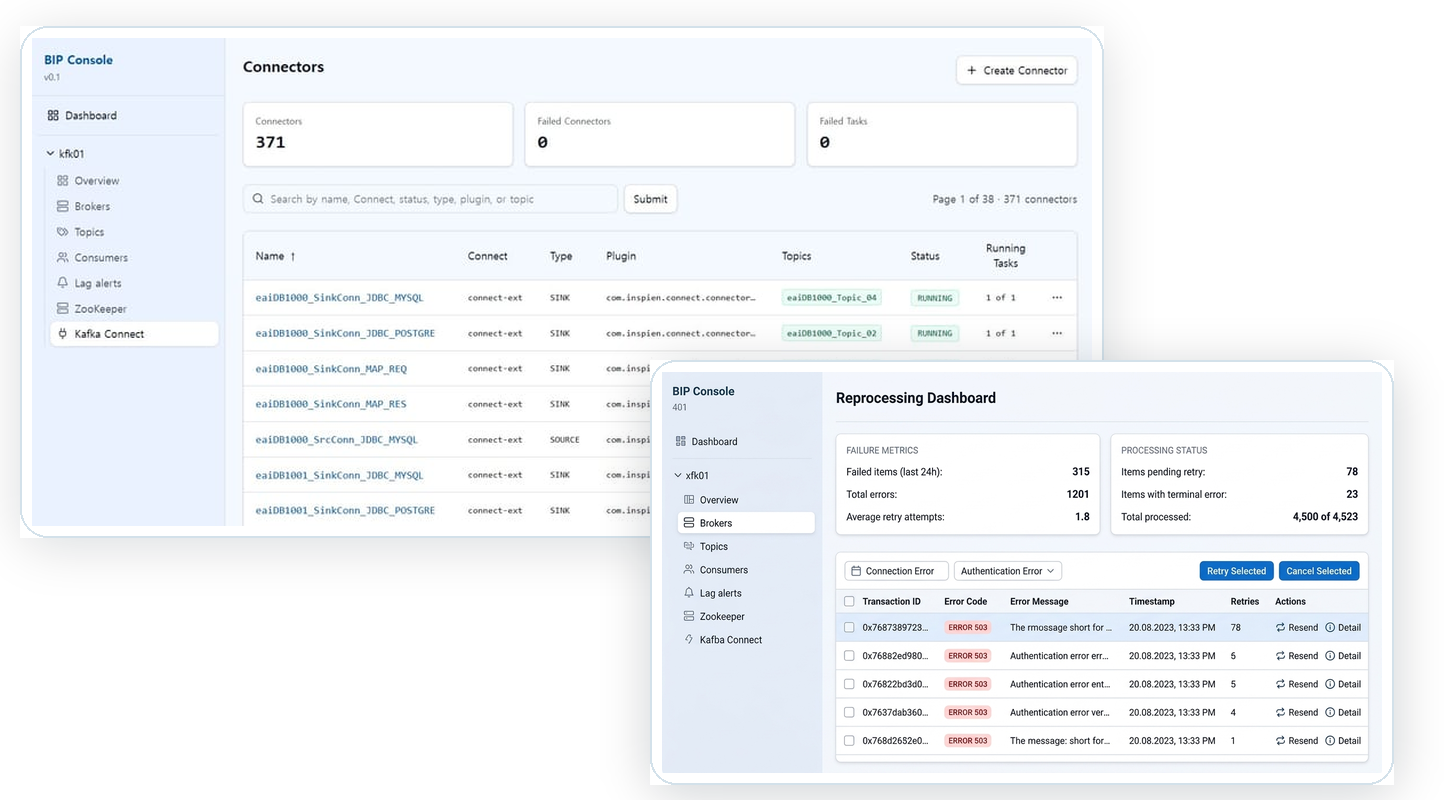
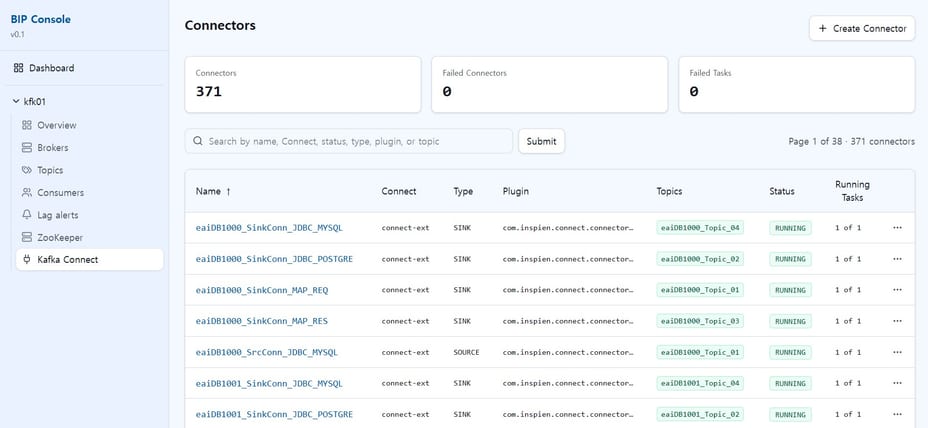
BizInsider B.I.P Console · Connector Dashboard
BizInsider B.I.P Connector Dashboard Product Screen
Connector OperationsView Connector lists, runtime status, and Source/Sink configurations.
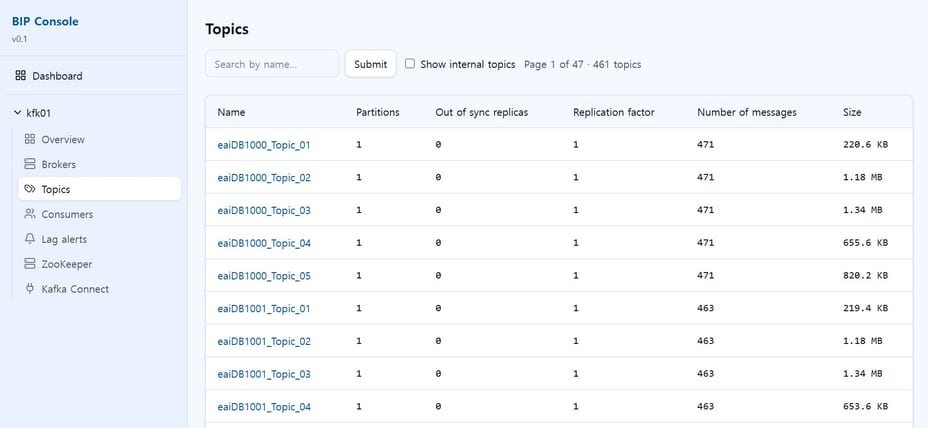
BizInsider B.I.P Console · Topic Monitoring
BizInsider B.I.P Topic Monitoring Product Screen
Topic OperationsView message counts, Partition configurations, and processing status by Topic.
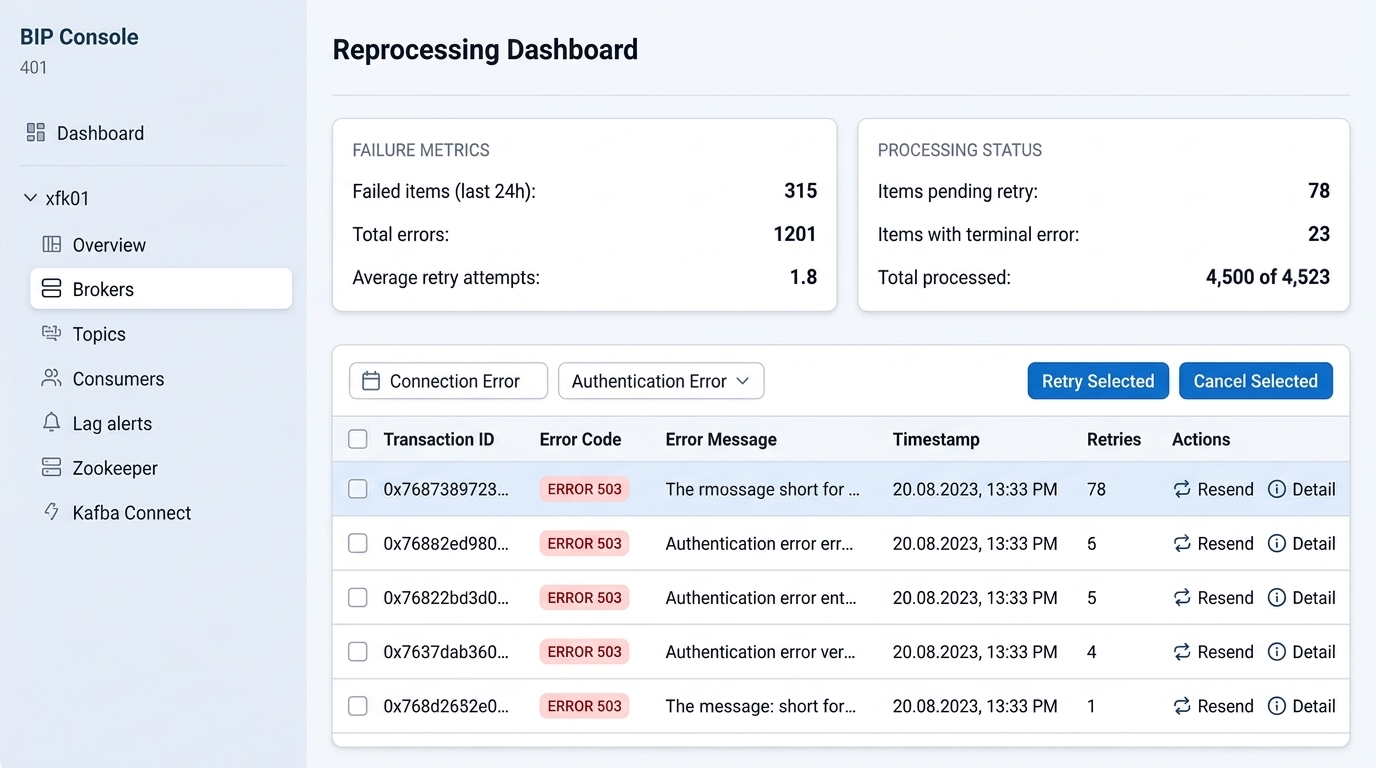
BizInsider B.I.P Console · Reprocessing Dashboard
BizInsider B.I.P Reprocessing Dashboard Product Screen
Interface Tracking · ReprocessingFind failed transactions, review error messages and processing status, and selectively reprocess them.
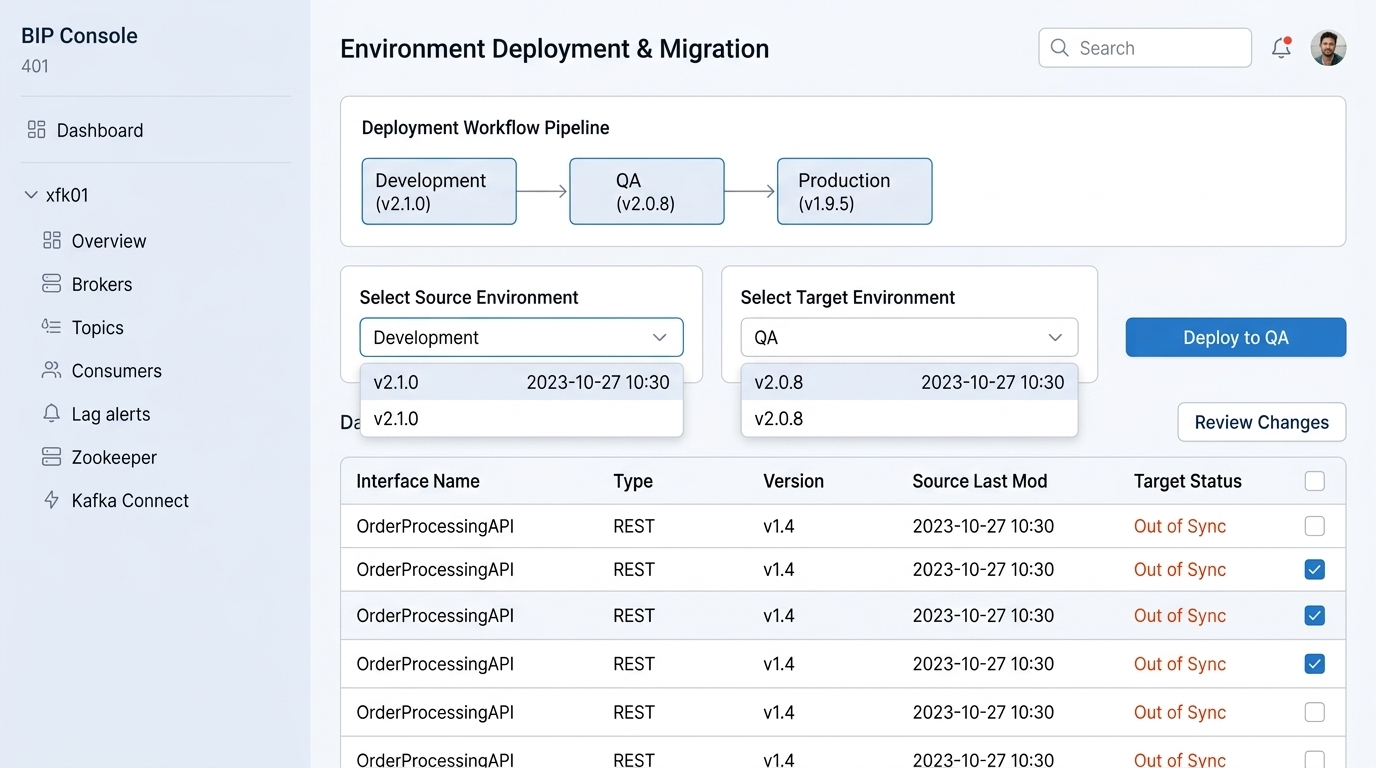
BizInsider B.I.P Console · Deployment & Migration
BizInsider B.I.P Deployment Migration Product Screen
Environment Deployment · MigrationManage interface migration and deployment status across development, QA, and production environments.
Performance Benchmark

BizInsider B.I.P Performance Can Be Evaluated
Through Benchmarks in a Validated Test Environment

Throughput, latency, and stability were measured in a three-broker environment where 108 Producers and 410 Consumers published and subscribed to Events simultaneously.

THROUGHPUT3,000msg/sec

Messages Processed per Second

DATA THROUGHPUT0.43MB/sec

Data Throughput per Second

AVG. LATENCY1.29sec

Average Publish-to-Receive Latency

MAX CONSUMER LAG5within 10 sec

Maximum Consumer Lag Within 10 Seconds

Test Environment

Broker
3 Nodes
Kafka
4.3.1
Partition
457
Producer / Consumer
108 / 410
Average Message Size
0.143 KB / msg
ACK
all
Hardware
8 Core · 16 GB · HDD 100 GB

Stability Validation · RF 3

  • 24 HoursContinuous Load Test Passed
  • Broker RestartNo Data Loss on Restart
  • Network RecoveryAutomatic Recovery After Network Disconnection
  • ReprocessingReprocessing Function Verified
Connectivity

Connect SAP, Databases, APIs, and Files

Configure connectors around the integration methods already used in your enterprise systems, with business-specific extensions available where required.

CDC: Capture Only Changed Database Records

In supported database and configuration environments, Insert, Update, and Delete changes can be captured without directly modifying the source business application. Applicability should be confirmed in advance.

DatabaseJDBC · Oracle · MSSQL · MySQL · Multi-Table
ERP / SAPSAP RFC · Bidirectional Server / Client Integration
API / WebREST · SOAP · HTTP API
FileSFTP · FTP · Delimited · Fixed-width
Custom PluginsSupport for custom extension development based on business requirements and interface environments
How to Start

Validate a Focused Use Case First, Then Scale Step by Step

Rather than replacing every system at once, we recommend validating an interface or data distribution use case with a clear expected benefit and expanding based on operational results.

Systems to Be Integrated
Average · Peak Daily Volume
Message Retention · Reprocessing Requirements
Operations · Alerting Standards
STEP 01

Select a Use Case · Validate Feasibility

Review connected systems, data volumes, and processing requirements, then select one representative use case and define the PoC scope and schedule.

STEP 02

Build the Production Environment · Migrate

Define operations, security, and monitoring standards, and migrate use cases in stages while running existing integration in parallel where needed.

STEP 03

Expand Business Use Cases · Consumers

Extend validated integration patterns to related business processes and analytics use cases in stages.

FAQ

Frequently Asked Questions Before Adopting BizInsider B.I.P

Scope and implementation approach may vary depending on existing integration methods, data volume, operational requirements, and security requirements.

Can We Deploy Only EAI or Only Data Streaming?

Yes. Depending on your business objective, you can consider system-to-system integration only, data streaming only, or a combined architecture using both.

Do We Need to Replace Our Entire Existing EAI Environment?

Not necessarily. You can keep your existing integration environment and introduce BizInsider B.I.P incrementally for new use cases or selected integration and distribution segments.

Does BizInsider B.I.P Replace Every Hub Database?

No. Databases required for SQL queries, aggregation, or long-term retention can remain in place. BizInsider B.I.P can be used to move selected repeated distribution processes from Hub DB–based patterns to a Topic-based model.

Can Data Be Captured Without Modifying the Source Application?

In supported database and configuration environments, CDC (Change Data Capture) can collect changes without modifying the source business application. Database type, permissions, and logging configuration should be reviewed in advance.

Where Should We Start?

We recommend starting with one interface whose volume and integration flow are easy to assess, or one Hub DB distribution segment. PoC scope and duration are defined after reviewing the customer environment.

Consider a Unified Approach to Complex System Integration and Data Distribution with BizInsider B.I.P

Share your current EAI architecture, Hub DB and batch operations, and SAP/DB/API integration requirements, and we can review applicable use cases and an appropriate validation approach together.

Talk to Us About BizInsider B.I.P →
Family Site ▾