



 IFM
Unify Interface Operations
with One Standard.
BizInsider IFM (Interface Governance) connects interface requests, reviews, development, deployment, changes, retirement, and status management across SAP, Cloud, Legacy, and external partners through a standardized process. Specifications, connection information, change history, and operational status are managed in the same interface to maintain consistent governance standards.
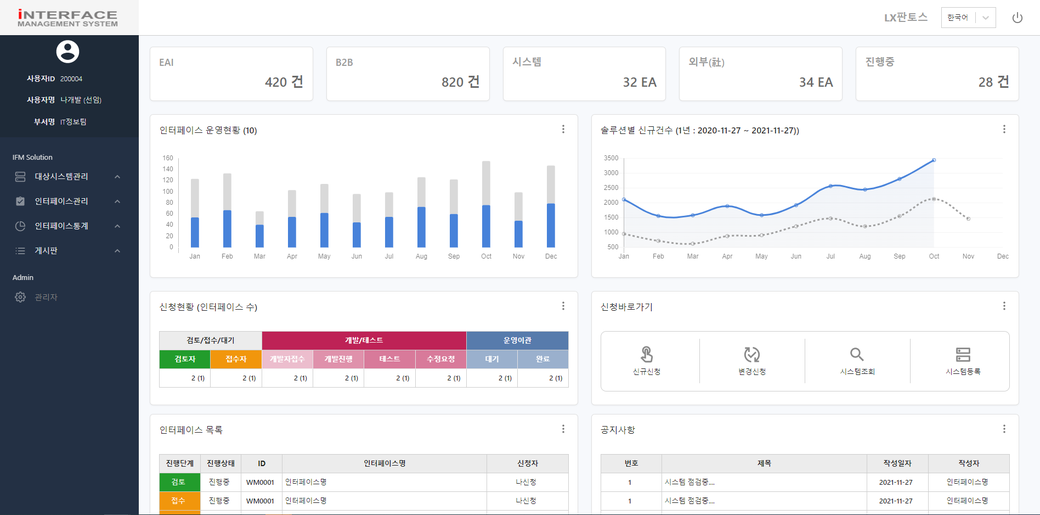
Knowing Who Changed What, Under Which Standard, and Being Able to
Trace It End to End.
Replace Operations Scattered Across Spreadsheets and Separate Tools
with One Consistent Management Standard
When specifications, connection information, change history, approval workflows, and monitoring are stored in different places, even checking the current status of a single interface can require multiple tools and stakeholders.
From SAP to Cloud and External Partners,
One Governance Standard
IFM does not replace interface execution engines. It acts as a governance layer above multiple integration platforms and systems, centrally managing specifications, requests, changes, and status information.
BizInsider IFM
Status · Monitoring
Manage an Interface from Initial Request to Retirement
through the Same Workflow
Manage not only new interfaces but also changes and retirement based on requests and history, keeping operational control and current-state information within one continuous process.
Request
Create requests for new, changed, or retired interfaces and define target systems and integration requirements
Review
Manage standards compliance, impact scope, and approval/rejection comments against the request
Acceptance
Solution owners accept requests and assign responsible engineers and processing scope
Development · Testing
Record mapping definitions, development, unit-test results, and processing status in the same workflow
Deployment · Operations
Move to production after testing and continue tracking subsequent changes, retirement, and current-state history
Operate Five Core Governance Areas
within One Product
I/F Target System Management
Register internal and external systems and organize system IDs, connection information, classifications, owners, and Landscape information.
System ID · NamespaceFTP · DB · HTTP · REST
New · Change · Retirement Management
Manage the Request → Review → Acceptance → Development → Deployment workflow and reasons for changes or retirement at the request level.
Request FlowApproval · History
Status Management
Search interfaces by stage, system, and classification and review notes, connection information, and change/retirement records.
Search · MemoExcel Export
Master Data · Users · Manuals
Keep Solution definitions, mapping standards, user permissions, and operations manuals up to date together with change history.
Standards · RolesManual
Log Aggregation · Operational Analysis
Aggregate interface Logs by date, time, and error code to provide baseline statistics for operational analysis and quality assessment.
I/F Log · Error CodeOperational Analytics
See the Key Capabilities of
BizInsider IFM in Actual Product Screens
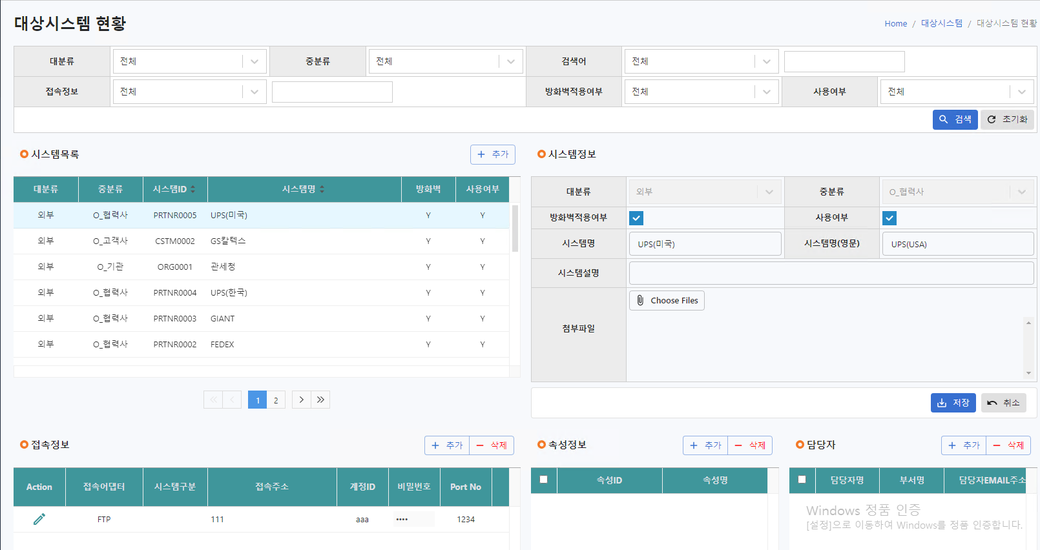
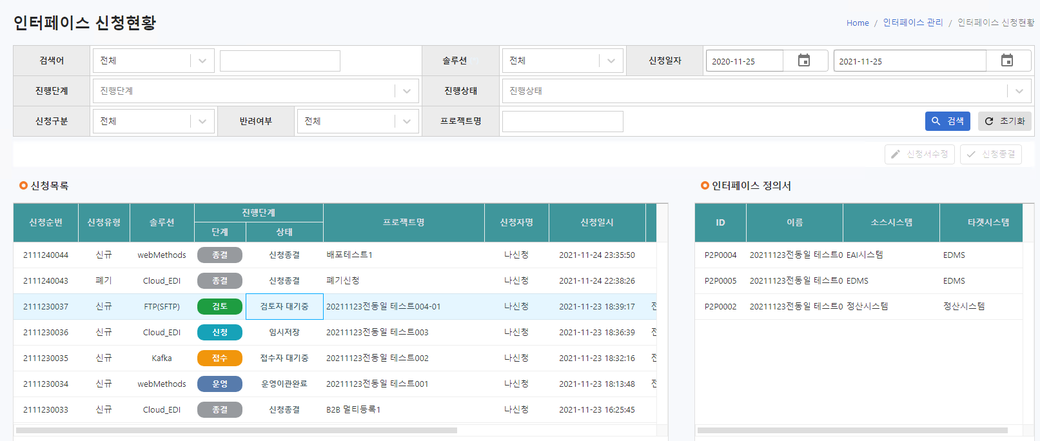
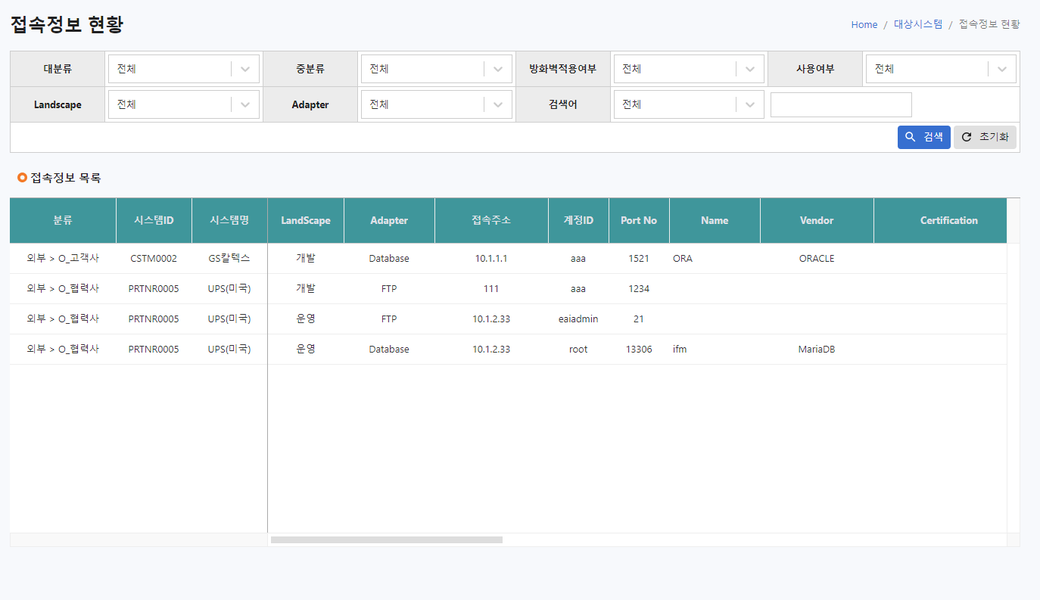
Explore how operators manage dashboards, target systems, request status, connection information, and other key data through actual IFM screens.
Separate Responsibilities,
Connect the Full Activity History
Business departments and integration operations teams work from the same request while performing their respective roles, and can cross-reference ITSM CSR processing history where needed.
Requester
Create, edit, and view new, change, and retirement requests.
Reviewer
Review compliance with standards and record approval or rejection comments.
Solution Coordinator
Owners for SAP PO, B2B, and other solutions accept reviewed requests.
Developer
Register mapping definitions, development work, unit-test results, and deploy the interface to operations.
When Governance Standards Are Defined,
the Information Operations Teams See Changes Too
Enterprise-Wide Visibility
Review ID · Status · History · Connection Information by interface.
Change · Approval Control
Track approval results and change impact through standard workflows and change history.
Early Warnings · Status
Review processing status, early warnings, incident detection, and resolution history together.
Standards Compliance
Apply Naming, protocol, approval, and monitoring standards consistently.
Operational Efficiency
Simplify communication and decision-making across responsible teams through the same screens and workflows.
Start Governance
with a Single Interface
Instead of changing the entire operating model at once, select a use case with clear value, define governance standards, and expand gradually to adjacent business areas.
Select a Target Use Case
Select one interface with clear expected benefits and define the adoption priority.
Build the Standard Environment
Define standard data fields, registration procedures, roles, and separation criteria across development · QA · production environments.
Expand · Institutionalize
Expand into adjacent business areas based on operational results and update existing specifications and status information along the way.
Continuous Operations
Maintain governance standards through monitoring, alerts, and Help Desk operations.
Before Adopting BizInsider IFM
Frequently Asked Questions
Does BizInsider IFM Replace Existing EAI Platforms?
No. IFM can be used as a governance layer above integration platforms such as EAI, B2B, SAP PO, and SAP Integration Suite to centrally manage interface specifications, request/change workflows, status, and history.
Can We Choose Between SaaS and On-Premise?
Based on the provided product information, both SaaS subscription and On-Premise licensing models are supported. The actual architecture and level of permission separation are defined according to the customer environment and licensing policy.
Can IFM Manage Interfaces Such as FTP, SFTP, and Kafka?
Yes. The new-interface process described in the product information includes FTP, SFTP, Kafka, C-EDI, and other integration types, with target systems and connection information registered and managed together.
Can IFM Be Connected to Existing ITSM Processes?
An operating model can be configured to cross-reference ITSM request, review, approval, and closure history with IFM requests using the CSR number.
Before Creating More Interfaces,
It May Be Time to Define the Operating Standards.
Share your current interface inventory, EAI/B2B/FTP operating environment, and request/change processes, and we can review the appropriate IFM scope and a phased adoption approach.

